

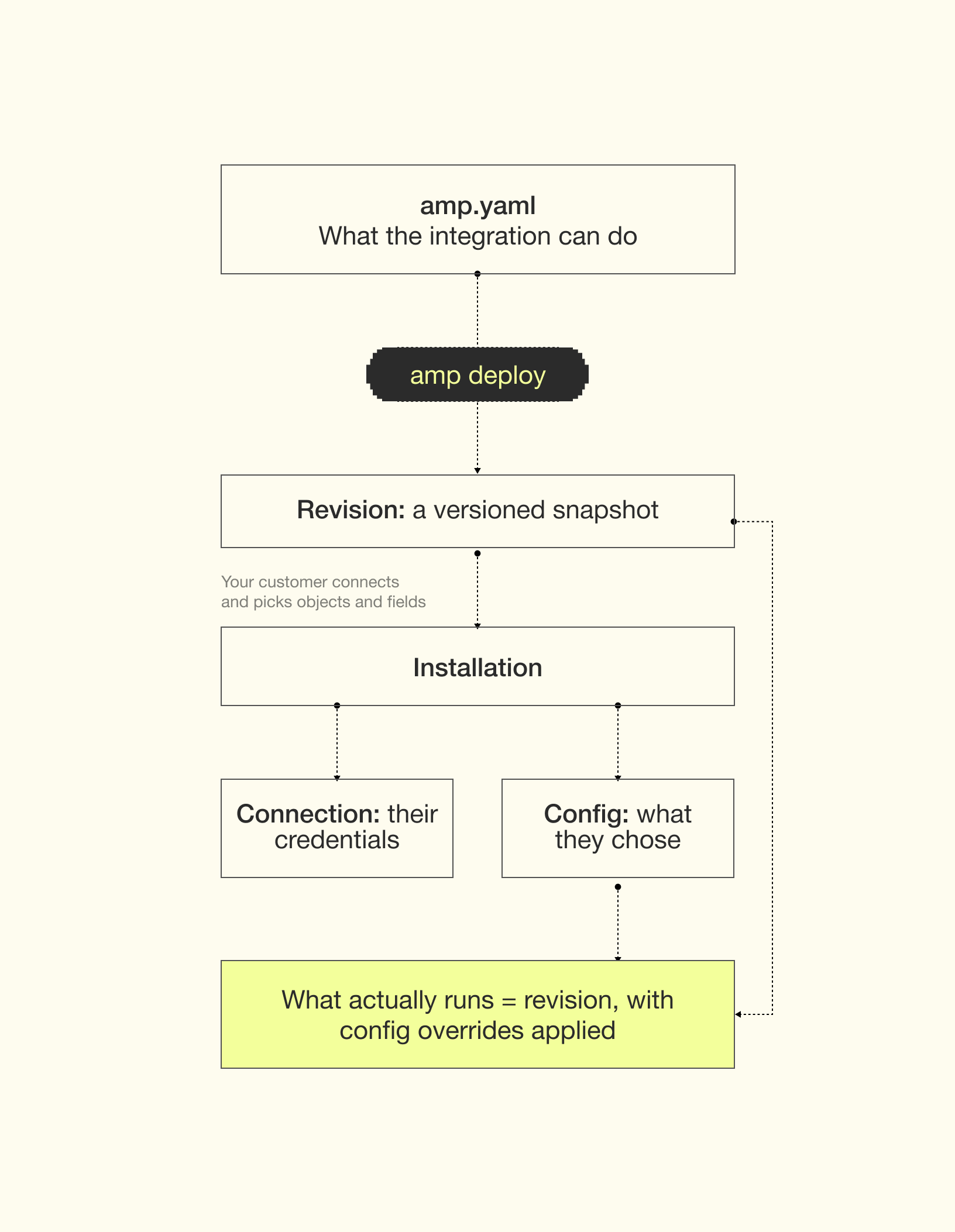
amp.yaml (also called the manifest). Each customer then connects their own account and chooses how much of that to enable. Ampersand stores those choices as a config and runs the integration against that customer’s account on their behalf.
Integration
An integration defines how your application works with a third-party system. You build it once, and every customer who connects that system uses it. For example, one integration calledsalesforce-accounts serves all of your Salesforce customers. Salesforce is the provider.
You create an integration by defining it in your amp.yaml and deploying it with the amp CLI.
Your amp.yaml describes what is possible, not what any particular customer has turned on. It can say:
- objects and fields that are always read (
requiredFields) - fields the customer may choose from (
optionalFields, oroptionalFieldsAuto: all) - fields the customer must map to one of their own fields (
mapToName) - a schedule, a destination, and backfill behavior
What's the difference between an integration and an installation?
What's the difference between an integration and an installation?
The integration is what you build, once, for all your customers. An installation is created for each customer that uses that integration.
Revision
Every time you changeamp.yaml and run amp deploy, Ampersand stores a new revision, a versioned snapshot of the integration’s definition.
If I add an object to amp.yaml and deploy, do existing customers get it?
If I add an object to amp.yaml and deploy, do existing customers get it?
Only if the object is under
read and you mark it enabled: always. Then all installations start reading from that object. See always-enabled objects. Otherwise only new installations read that object by default. To have an existing installation read it, ask that customer to reopen the page where you embedded the Ampersand UI and go through the setup process for that object. Alternatively, call the Update an installation API.Installation
There’s an installation for each customer that uses an integration. For example, an integration calledsalesforce-accounts might have 30 installations, one for each customer who has connected their Salesforce.
An installation is created when a customer finishes setup in the InstallIntegration component, or when you call the Create installation endpoint. Deploy your amp.yaml first: without a deployed integration, there’s nothing to install.
When you add the component to your product, you tell Ampersand which integration to install and who it’s for:
Connection
The credentials for that customer’s account. Ampersand supports many auth methods, and handles token refresh for you.
Config
That customer’s choices, which act as overrides on the integration’s definition: fields, mappings, schedule, etc.
What's the difference between a connection and an installation?
What's the difference between a connection and an installation?
A connection is only the customer’s credentials. Connecting an account on its own, for example with the
ConnectProvider component, creates a connection but not an installation. A connection alone doesn’t do anything. An installation is needed for anything to actually happen (like reading data, writing data).That’s also why you can change a customer’s setup without them signing in again: update their config by showing them the InstallIntegration component again, or call Update an installation API. Their connection stays as it is.Putting it together
1
You deploy an integration
amp deploy creates a revision. Nothing runs yet.2
A customer connects
They sign in to their own account in your product. That creates a connection.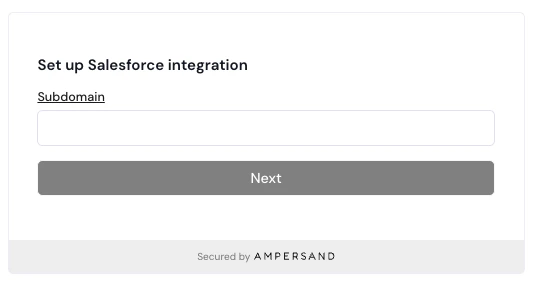
3
They configure the integration
Their selections become the config. Each part of your 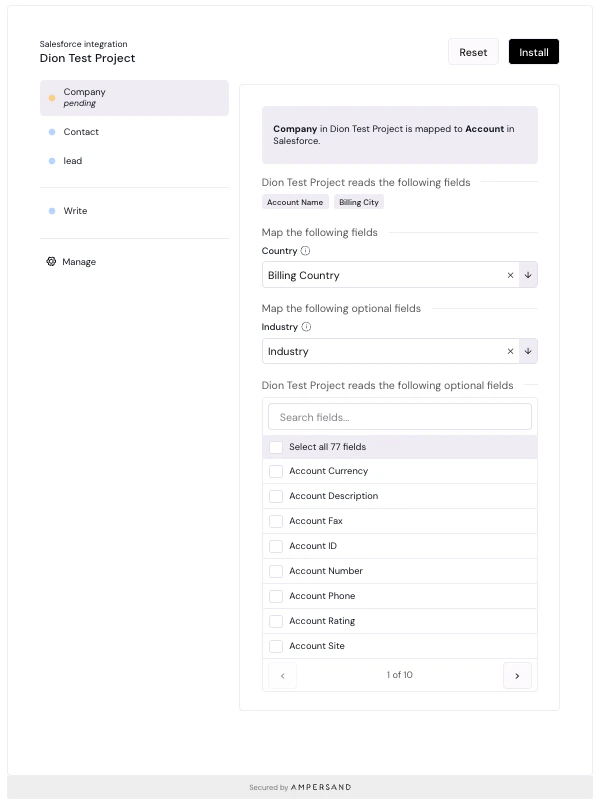
amp.yaml shows up on this screen. Required fields are listed as fields your app reads. Each mapToName becomes a “Map the following fields” dropdown, with your prompt as the tooltip. Optional fields are a list they can check. When they click the “Install” button, that creates an installation.4
Ampersand runs it
Ampersand uses your revision with their config’s overrides applied. Reads and subscriptions run on their own and deliver results to your destination. Writes, searches, and proxy calls run against their account whenever your app calls the API.
How config overrides a revision
The config records one customer’s choices for an installation, as overrides on top of the revision.Anything the config specifies wins for that installation. Anything it leaves unset falls back to what the integration’s revision defines.
Is my amp.yaml the same as a customer's config?
Is my amp.yaml the same as a customer's config?
No. Your
amp.yaml defines what’s possible for everyone. A config holds only what one customer chose or changed. What runs for that customer is your revision with their config applied on top.What a config can override
What a config can’t do
- Remove a required field from a read action. Required fields always come from your revision. A config can only add fields to read.
Example
Suppose youramp.yaml declares:
renewalDate to their contract_end__c field, adds two optional fields, and leaves everything else alone. This is what their config would look like. If you are using the UI library, it will construct this for you.
name(required field from youramp.yamlfile)industry(optional field from config)website(optional field from config)contract_end__cdelivered asrenewalDate(field mapping from config)
amp.yaml file).
If that customer later asks for every 30 minutes, you set schedule on their config to */30 * * * *. It now overrides the default schedule, but only for them. Every other installation still reads accounts every 10 minutes.
You can read the existing config of an installation with Get an installation API. You can change it with Update an installation API, or ask your customer to re-open the page where you embedded the InstallIntegration component to modify their choices.