> ## Documentation Index
> Fetch the complete documentation index at: https://docs.withampersand.com/llms.txt
> Use this file to discover all available pages before exploring further.

# AccuLynx

## What's supported

### Supported actions

This connector supports:

* [Read Actions](/read-actions), including full historic backfill. **Please note that incremental read is only supported for `jobs`, `jobs/history`, `jobs/custom-fields`, `contacts/custom-fields`, `estimates/sections`, and `company-settings/custom-fields`.**
* [Write Actions](/write-actions).
* [Subscribe Actions](/subscribe-actions). Ampersand creates and updates the AccuLynx webhook subscription on your behalf when the customer installs your integration — no manual webhook setup is required in the AccuLynx UI.
* [Proxy Actions](/proxy-actions), using the base URL `https://api.acculynx.com`.

### Supported objects

The AccuLynx connector supports the following objects:

export const rows = [{
  label: "acculynx/countries",
  read: true,
  write: false,
  subscribe: false,
  href: "https://apidocs.acculynx.com/reference/getacculynxcountries"
}, {
  label: "acculynx/units-of-measure",
  read: true,
  write: false,
  subscribe: false,
  href: "https://apidocs.acculynx.com/reference/getacculynxunitsofmeasure"
}, {
  label: "calendars",
  read: true,
  write: false,
  subscribe: false,
  href: "https://apidocs.acculynx.com/reference/getcalendars"
}, {
  label: "calendars/appointments",
  read: true,
  write: false,
  subscribe: false,
  href: "https://apidocs.acculynx.com/reference/getcalendars"
}, {
  label: "company-settings/custom-fields",
  read: true,
  write: false,
  subscribe: false,
  href: "https://apidocs.acculynx.com/reference/getcompanysettingscustomfields"
}, {
  label: "company-settings/job-file-settings/document-folders",
  read: true,
  write: false,
  subscribe: false,
  href: "https://apidocs.acculynx.com/reference/getcompanydocumentfolders"
}, {
  label: "company-settings/job-file-settings/insurance-companies",
  read: true,
  write: false,
  subscribe: false,
  href: "https://apidocs.acculynx.com/reference/getinsurancecompanies"
}, {
  label: "company-settings/job-file-settings/job-categories",
  read: true,
  write: false,
  subscribe: false,
  href: "https://apidocs.acculynx.com/reference/getcompanysettingsjobsettingsjobcategories"
}, {
  label: "company-settings/job-file-settings/photo-video-tags",
  read: true,
  write: false,
  subscribe: false,
  href: "https://apidocs.acculynx.com/reference/getphotovideotags"
}, {
  label: "company-settings/job-file-settings/trade-types",
  read: true,
  write: false,
  subscribe: false,
  href: "https://apidocs.acculynx.com/reference/getcompanysettingsjobsettingstradetypes"
}, {
  label: "company-settings/job-file-settings/work-types",
  read: true,
  write: false,
  subscribe: false,
  href: "https://apidocs.acculynx.com/reference/getcompanysettingsjobsettingsworktypes"
}, {
  label: "company-settings/job-file-settings/workflow-milestones",
  read: true,
  write: false,
  subscribe: false,
  href: "https://apidocs.acculynx.com/reference/getmilestones"
}, {
  label: "company-settings/leads/lead-sources",
  read: true,
  write: false,
  subscribe: false,
  href: "https://apidocs.acculynx.com/reference/getactiveleadsources"
}, {
  label: "company-settings/location-settings/account-types",
  read: true,
  write: false,
  subscribe: false,
  href: "https://apidocs.acculynx.com/reference/getactiveaccounttypes"
}, {
  label: "contacts",
  read: true,
  write: true,
  subscribe: true,
  href: "https://apidocs.acculynx.com/reference/contacts"
}, {
  label: "contacts/contact-types",
  read: true,
  write: false,
  subscribe: false,
  href: "https://apidocs.acculynx.com/reference/contacts"
}, {
  label: "contacts/custom-fields",
  read: true,
  write: true,
  subscribe: true,
  href: "https://apidocs.acculynx.com/reference/getcontactcustomfields"
}, {
  label: "contacts/email-addresses",
  read: true,
  write: false,
  subscribe: false,
  href: "https://apidocs.acculynx.com/reference/getcontactemailaddresses"
}, {
  label: "contacts/logs",
  read: false,
  write: true,
  subscribe: false,
  href: "https://apidocs.acculynx.com/reference/postcontactlog"
}, {
  label: "contacts/phone-numbers",
  read: true,
  write: true,
  subscribe: false,
  href: "https://apidocs.acculynx.com/reference/contacts"
}, {
  label: "estimates",
  read: true,
  write: false,
  subscribe: false,
  href: "https://apidocs.acculynx.com/reference/estimates"
}, {
  label: "estimates/sections",
  read: true,
  write: false,
  subscribe: false,
  href: "https://apidocs.acculynx.com/reference/estimates"
}, {
  label: "jobs",
  read: true,
  write: true,
  subscribe: true,
  href: "https://apidocs.acculynx.com/reference/jobs"
}, {
  label: "jobs/contacts",
  read: true,
  write: false,
  subscribe: true,
  href: "https://apidocs.acculynx.com/reference/getjobcontacts"
}, {
  label: "jobs/custom-fields",
  read: true,
  write: true,
  subscribe: true,
  href: "https://apidocs.acculynx.com/reference/getjobcustomfields"
}, {
  label: "jobs/estimates",
  read: true,
  write: false,
  subscribe: false,
  href: "https://apidocs.acculynx.com/reference/jobs"
}, {
  label: "jobs/external-references",
  read: false,
  write: true,
  subscribe: false,
  href: "https://apidocs.acculynx.com/reference/jobs"
}, {
  label: "jobs/history",
  read: true,
  write: false,
  subscribe: false,
  href: "https://apidocs.acculynx.com/reference/jobs"
}, {
  label: "jobs/initial-appointment",
  read: false,
  write: true,
  subscribe: false,
  href: "https://apidocs.acculynx.com/reference/jobs"
}, {
  label: "jobs/insurance/insurance-company",
  read: false,
  write: true,
  subscribe: false,
  href: "https://apidocs.acculynx.com/reference/jobs"
}, {
  label: "jobs/invoices",
  read: true,
  write: false,
  subscribe: true,
  href: "https://apidocs.acculynx.com/reference/jobs"
}, {
  label: "jobs/messages",
  read: false,
  write: true,
  subscribe: false,
  href: "https://apidocs.acculynx.com/reference/jobs"
}, {
  label: "jobs/messages/replies",
  read: false,
  write: true,
  subscribe: false,
  href: "https://apidocs.acculynx.com/reference/jobs"
}, {
  label: "jobs/milestone-history",
  read: true,
  write: false,
  subscribe: true,
  href: "https://apidocs.acculynx.com/reference/jobs"
}, {
  label: "jobs/payments/expense",
  read: false,
  write: true,
  subscribe: false,
  href: "https://apidocs.acculynx.com/reference/jobs"
}, {
  label: "jobs/payments/paid",
  read: false,
  write: true,
  subscribe: false,
  href: "https://apidocs.acculynx.com/reference/jobs"
}, {
  label: "jobs/payments/received",
  read: false,
  write: true,
  subscribe: false,
  href: "https://apidocs.acculynx.com/reference/jobs"
}, {
  label: "jobs/representatives",
  read: true,
  write: false,
  subscribe: true,
  href: "https://apidocs.acculynx.com/reference/jobs"
}, {
  label: "jobs/representatives/ar-owner",
  read: false,
  write: true,
  subscribe: false,
  href: "https://apidocs.acculynx.com/reference/jobs"
}, {
  label: "jobs/representatives/company",
  read: false,
  write: true,
  subscribe: false,
  href: "https://apidocs.acculynx.com/reference/jobs"
}, {
  label: "jobs/representatives/sales-owner",
  read: false,
  write: true,
  subscribe: false,
  href: "https://apidocs.acculynx.com/reference/jobs"
}, {
  label: "supplements",
  read: true,
  write: false,
  subscribe: false,
  href: "https://apidocs.acculynx.com/reference/supplements"
}, {
  label: "supplements/items",
  read: true,
  write: false,
  subscribe: false,
  href: "https://apidocs.acculynx.com/reference/supplements"
}, {
  label: "supplements/notations",
  read: true,
  write: false,
  subscribe: false,
  href: "https://apidocs.acculynx.com/reference/supplements"
}, {
  label: "users",
  read: true,
  write: false,
  subscribe: false,
  href: "https://apidocs.acculynx.com/reference/users"
}];

export const Check = () => <span>✅</span>;
export const Cross = () => <span>🚫</span>;

export function renderCellValue(value) {
  if (typeof value === "boolean") {
    return value ? <Check /> : <Cross />;
  }
  if (typeof value === "string" && value.startsWith("<")) {
    return <span dangerouslySetInnerHTML={{
      __html: value
    }} />;
  }
  return value;
}

<div style={{width: '100%', overflowX: 'auto', display: 'block'}}>
  <table
    style={{
width: '100%',
minWidth: '100%',
tableLayout: 'fixed',
textAlign: 'center',
borderCollapse: 'collapse',
display: 'table'
}}
  >
    <thead style={{display: 'table-header-group', width: '100%'}}>
      <tr style={{display: 'table-row', width: '100%'}}>
        <th style={{textAlign: 'left', width: '40%'}}>Object</th>
        <th style={{width: '20%'}}>Read</th>
        <th style={{width: '20%'}}>Write</th>
        <th style={{width: '20%'}}>Subscribe</th>
      </tr>
    </thead>

    <tbody style={{display: 'table-row-group', width: '100%'}}>
      {[...rows]
                .sort((a, b) => a.label.localeCompare(b.label))
                .map((row) => (
                  <tr id={"row/" + row.label} key={row.label}>
                    <td style={{textAlign: "left"}}>
                      <a href={row.href}>{row.label}</a>
                    </td>
                    <td>{renderCellValue(row.read)}</td>
                    <td>{renderCellValue(row.write)}</td>
                    <td>{renderCellValue(row.subscribe)}</td>
                  </tr>
                ))}
    </tbody>
  </table>
</div>

<Note>
  **Writes are limited by AccuLynx's API:**

  * **Create-only:** `jobs`, `contacts`, and their nested write endpoints (except custom-fields) — AccuLynx has no update endpoints for these records.
  * **Update-only:** `contacts/custom-fields` and `jobs/custom-fields` — you can change a custom field's value, but cannot create, update, or delete the field definitions themselves.
</Note>

**Custom fields** defined in AccuLynx are automatically discovered and surfaced on `contacts` and `jobs` records.

**Subscribe events:** create and update are supported directly on `contacts` and `jobs`. The other 6 subscribe-enabled objects in the table above are subscribed via [`otherEvents`](/subscribe-actions#other-events) under their parent `contacts` or `jobs` object in your `amp.yaml`. AccuLynx emits additional `jobs` change topics too — financial, appointment, category, trade/work-type, and more — which you subscribe to the same way. See AccuLynx's [webhook topics reference](https://apidocs.acculynx.com/reference/gettopics) for the full list.

### Example integration

For an example manifest file of an AccuLynx integration, visit our [samples repo on Github](https://github.com/amp-labs/samples/blob/main/accuLynx/amp.yaml).

## Before you get started

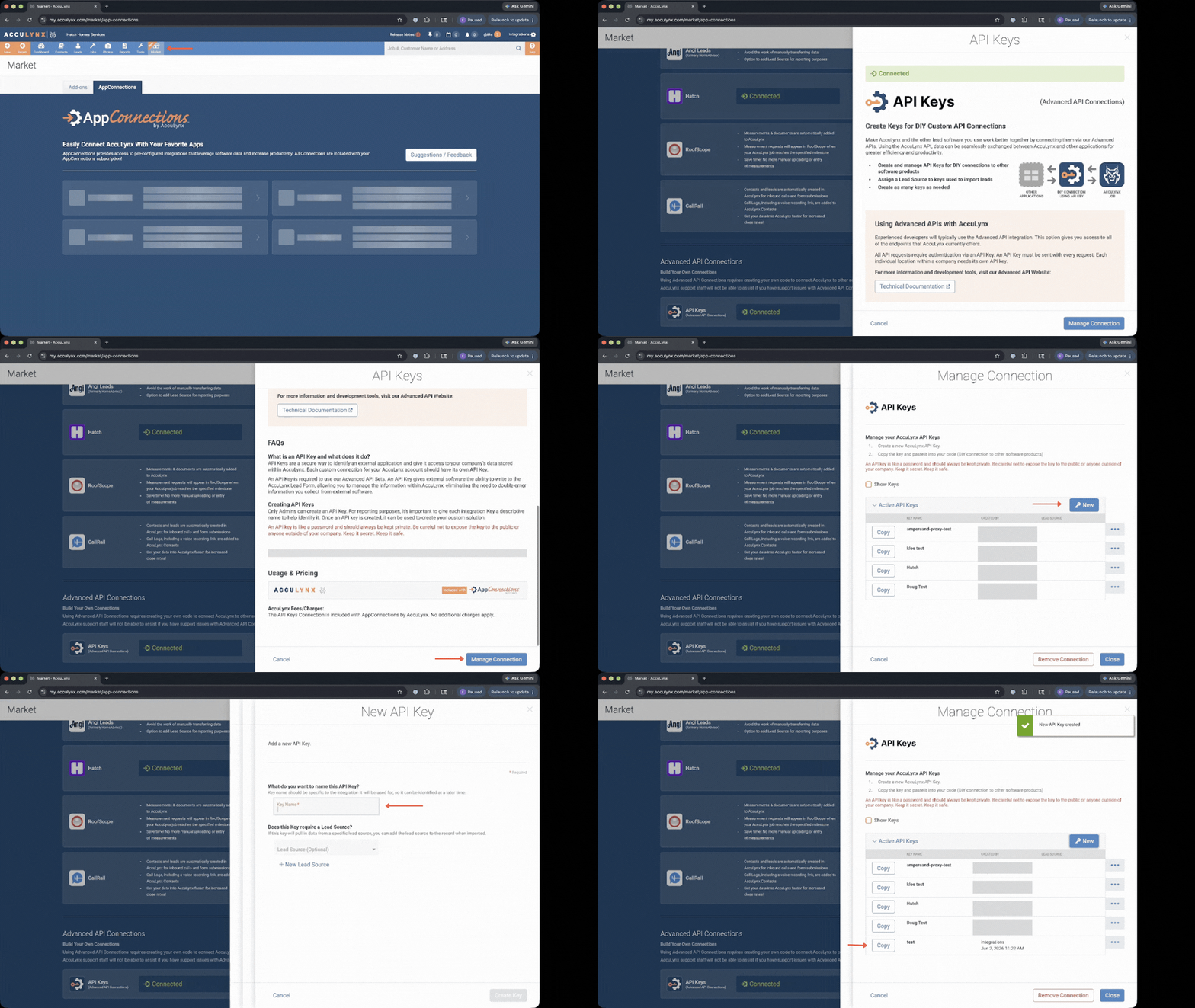
To use the AccuLynx connector, you'll need an API key from your AccuLynx account. Here's how to get it:

1. Sign in to your AccuLynx account as a Location or Company Administrator.
2. Click your name in the upper-right corner and select **Account Settings**.
3. In the left sidebar, expand **Add-On Features and Integrations** and click **API Keys** (or go directly to the [API Keys page](https://my.acculynx.com/apikeys)).
4. Click **Create Key**, enter a descriptive name, and select a Lead Source.
5. Click **Create Key** in the modal, then **Copy Key** to copy the token.

<img src="https://mintcdn.com/ampersand-24eb5c1a/VjFg13IKG_wp2BXs/images/provider-guides/acculynx.gif?s=f8d152abd08d2b3533184d2530398209" alt="AccuLynx API Key" width="1152" height="648" data-path="images/provider-guides/acculynx.gif" />

API keys are scoped to a single AccuLynx account location, so each Ampersand connection corresponds to one AccuLynx location. Each integration within an AccuLynx account location should have its own dedicated API key.

For more details, see the [AccuLynx Authentication documentation](https://apidocs.acculynx.com/reference/authentication).

## Using the connector

This connector uses **API Key authentication**, so you do not need to configure a Provider App before getting started. (Provider Apps are only required for providers using the **OAuth2 Authorization Code grant type**.)

To integrate with AccuLynx:

* Create a manifest file like the [example above](#example-integration).
* Deploy it using the [amp CLI](/cli/overview).
* If you are using Read Actions or Subscribe Actions, create a [destination](/destinations).
* Embed the [InstallIntegration](/embeddable-ui-components#install-integration) UI component, which will prompt the customer for their API key.
* Start using the connector!
  * If your integration has [Read Actions](/read-actions) or [Subscribe Actions](/subscribe-actions), you'll start getting webhook messages.
  * If your integration has [Write Actions](/write-actions), you can start making API calls to our Write API.
  * If your integration has [Proxy Actions](/proxy-actions), you can start making Proxy API calls.